
Paying is easy. And fast.
Pay quickly and securely with your KentBank card using your iPhone or Apple Watch.
Add your card via the KentPro app
Leave your wallet at home.
Your KentBank card is always with you on your Apple devices. Enjoy all the benefits of your KentBank card with the simplicity and convenience of Apple Pay.
Pay with peace of mind
Apple Pay is a simple and secure way to pay. Whether you are shopping in stores, online or in apps, you can pay in seconds without taking out your physical card or wallet.
Benefits
Easy – Pay in seconds with a simple tap on your Apple device.
Secure – Every payment is protected by Face ID, Touch ID or your device passcode.
Private – Your card number is never shared with merchants during payment.
Accepted worldwide
Use Apple Pay wherever contactless payments are accepted – in stores, online and in apps.
How to add your KentBank card to Apple Wallet and activate Apple Pay
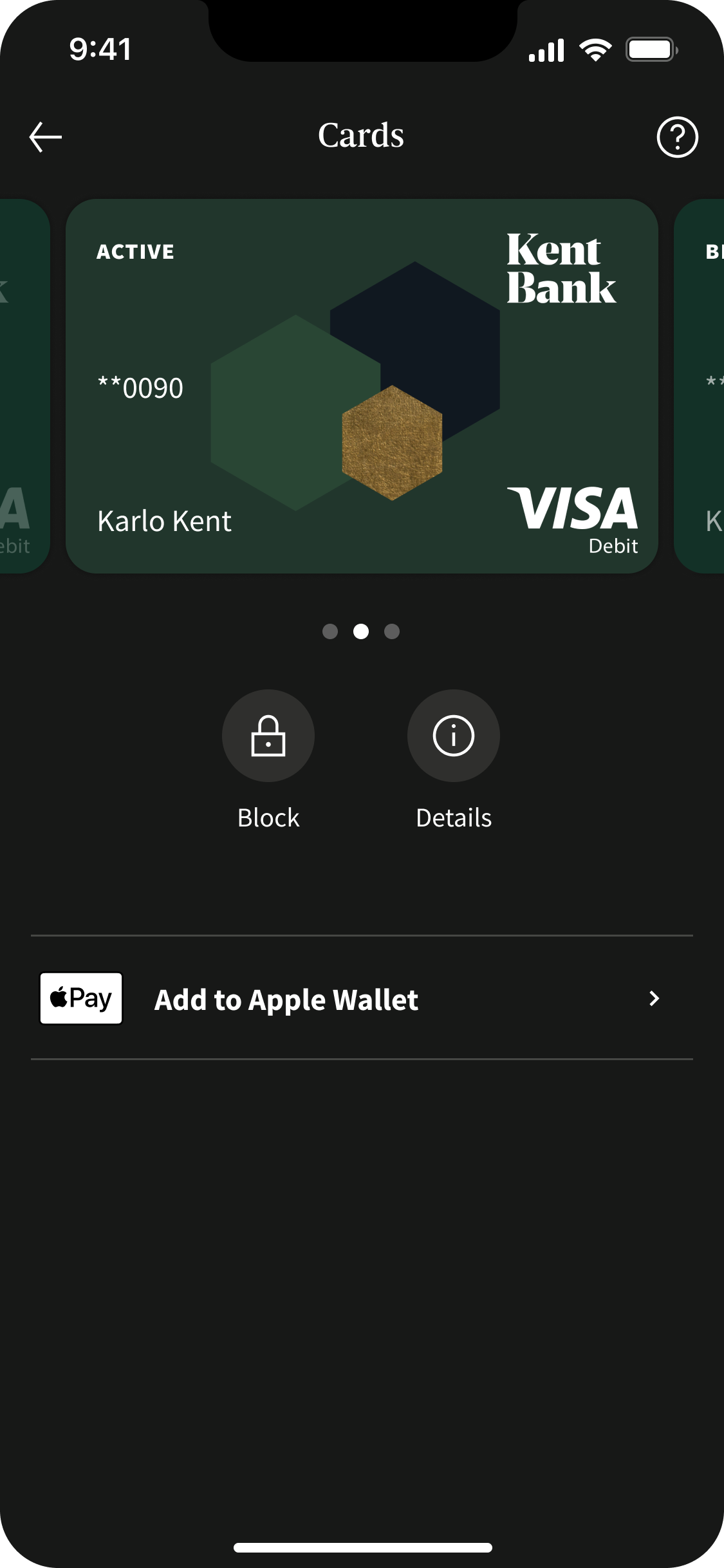
Add your card directly via the KentPro app
- Open the KentPro app.
- Select your card.
- Tap Add to Apple Wallet.
- Confirm using Face ID or your PIN.
- Follow the on-screen instructions and accept the Terms and Conditions.
- Your card is ready to use.
Add your card via the Apple Wallet app
Open the Apple Wallet app on your iPhone, tap Add Card, select your KentBank card and complete the verification in the KentPro app.
If you do not use KentPro, you can still add your card to Apple Wallet by calling our Contact Centre. We will verify your identity and activate your card for Apple Pay.
Use Apple Pay at locations where you see these symbols
Frequently Asked Questions
Which KentBank cards can I add to Apple Pay?
All KentBank debit and credit cards can be added to the Apple Wallet app.
Where can I use Apple Pay?
You can use Apple Pay wherever contactless payments are accepted – in stores, online and in apps.
Is there a fee for using Apple Pay?
No. Apple Pay is available at no additional cost.
Is Apple Pay secure?
Yes. Every payment requires authentication using Face ID, Touch ID or your device passcode, helping keep your transactions secure.
Can I use Apple Pay abroad?
Yes. Apple Pay works wherever contactless payments are accepted.
Can I use Apple Watch?
Yes. Once you add your card, you can make payments using both your iPhone and Apple Watch.
Can I add multiple cards?
Yes. You can add multiple cards to Apple Wallet.
How do I remove a card?
You can remove a card directly from Apple Wallet on the device to which it was added.
Need detailed instructions?
Download the Apple Pay User Guide for detailed step-by-step instructions.
Apple Pay User Guide